Continuation of the series “The Evolving Functional Role in Microsoft Fabric” (Part 2 of 5)
Previously, we uncovered how Copilot reshapes the functional landscape. Today, we step into the engine room of Fabric… where data engineering becomes accessible to everyone.
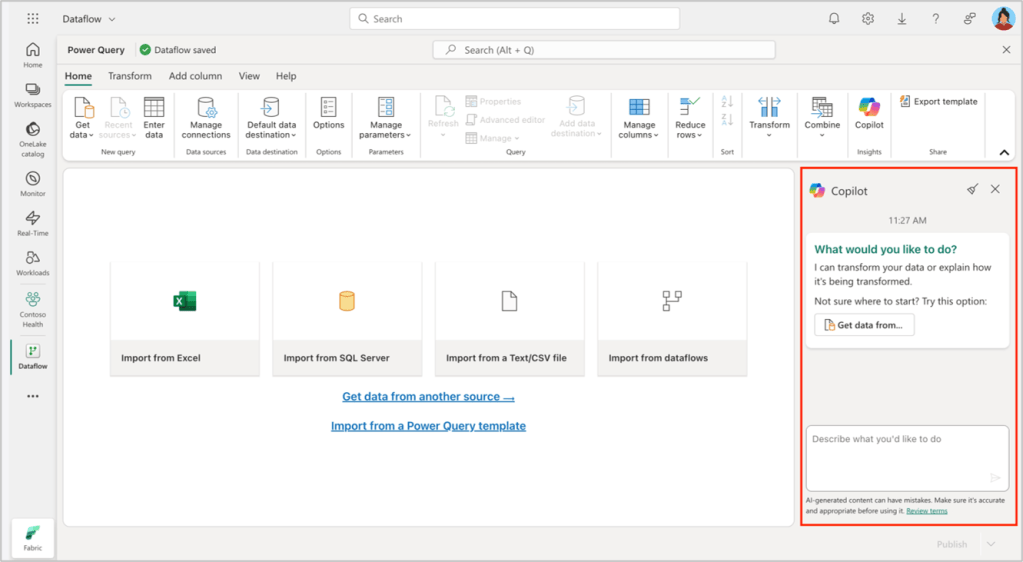
1. Copilot in Data Factory: Transforming Data Without Writing Code
Data Factory has always been powerful—but technically demanding. Copilot introduces a functional layer that allows professionals to:
- generate transformations,
- clean and prepare data,
- adjust column logic,
- explain each step,
- validate business rules,
- detect inconsistencies.
All without writing a single line of code.
Functional example
An analyst needs to classify customers by age. Before: they relied entirely on an engineer. Now they ask Copilot:
“Create an AgeRange column with business‑defined age categories.”
Copilot generates the transformation and explains the logic. The analyst reviews and approves it confidently.
Functional value
- Reduces dependency on technical teams.
- Accelerates decision‑making.
- Ensures business rules are applied correctly.
- Improves data quality from the functional side.
2. Copilot in Pipelines: Understanding Data Flows Without Engineering Skills
Pipelines are the backbone of data movement. Copilot enables functional roles to:
- generate activities,
- add steps,
- request summaries,
- understand source and destination,
- detect errors,
- validate flow logic.
Functional example
A consultant needs to confirm whether a pipeline is moving data correctly. Before: they waited for a technical explanation. Now they ask Copilot:
“Summarise this pipeline and explain its source and destination.”
Copilot returns:
- source,
- destination,
- table,
- activity purpose,
- dependencies.
No JSON. No logs. No engineering jargon.
Functional value
- Enables functional auditing of data processes.
- Improves communication between business and engineering.
- Reduces misunderstandings in data flows.
- Increases autonomy and clarity.
3. Copilot as a Bridge Between Business Logic and Technical Execution
Copilot does not replace engineers—it enhances collaboration.
Functional professionals can now:
- validate business rules,
- review transformations,
- understand flow logic,
- detect anomalies,
- request adjustments,
- document processes.
Functional example
A consultant notices duplicated records in a dataset. Before: they waited for engineering analysis. Now they ask Copilot:
“Explain why this activity might be producing duplicates.”
Copilot identifies potential causes:
- missing primary key,
- incorrect join,
- lack of filtering,
- transformation error.
The consultant enters the meeting informed and prepared.
4. Copilot as a Functional Documentation Tool
- Copilot can generate:
- summaries,
- descriptions,
- step‑by‑step logic,
- transformation explanations,
- dependency maps.
This turns Copilot into a functional documentation engine.
Functional example
A consultant must document a pipeline for a client. Before: they relied on engineers to describe each step. Now Copilot produces:
«This pipeline copies data from Azure SQL to Lakehouse, applying filters and transformations based on defined parameters.”
The consultant simply refines the wording for the client.
5. What This Means for Functional Roles
Copilot empowers functional professionals to:
- understand complex data processes,
- validate business logic,
- detect errors early,
- request precise changes,
- document flows clearly,
- participate in data engineering,
- reduce analysis time,
- improve data quality.
All without writing code. All without losing control of the process.
To conclude
Copilot democratises data engineering. It enables analysts and consultants to engage directly with data preparation, movement and validation. Fabric is no longer a purely technical platform—it is a collaborative environment where business roles act with autonomy, clarity and speed.
And the story deepens…

Deja una respuesta